1. How do you install a WordPress website?
In the following article we will try to explain to you step by step how to install WordPress with the installatron software.
Host Center web hosting company provides access to a quick, one-click WordPress installation software.
1. Access your cPanel system using the username and password provided to you by your hosting company.

2. After logging into the CPANEL system, search for the phrase: installatron in the search engine and click on its icon.

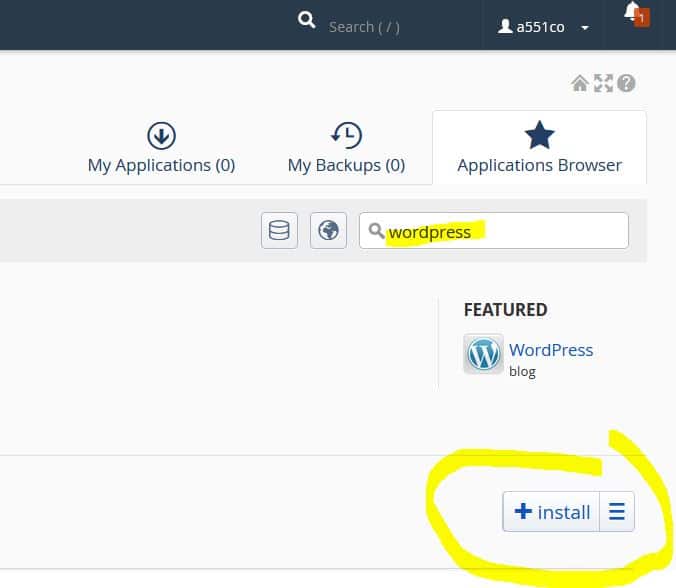
3. Then you reach the installatron screen and there is a search field where you search for wordpress and then enter.
Then click install.
4. On the installation screen, fill in the desired domain name – it is recommended to select it in the HTTPS configuration.
And choose a language for WordPress – Hebrew / English, etc.

5. You will also need to choose a configuration name that suits you for backups and, of course, choose a name and password to log in to WordPress management.

6. When the settings are complete, click Install.

7. Done and done. Wait patiently for the installation of the Installatron system to complete.
The installation includes essentially everything needed to run a WordPress website, including a database/files, etc.
Logging in is usually done by browsing to your website address with /wp-admin .
For example:
And that’s it, to work.
Now you need to start uploading content/theme/media, etc. to your WordPress site.
It should be noted that there are additional ways to install WordPress, such as:
1. Server-to-server WordPress site migration from within the WordPress system itself using Duplicator
2. Installing WordPress using files after downloading from the official WordPress website – https://wordpress.org/
3. Installing a WordPress website using WordPress Toolkit – an excellent system built by cPanel
4. Installation by Host Center – Free installation of WordPress for anyone who orders an Etherson package for one year.
- Host Center will install your WordPress website for free or transfer it to you from your previous provider, at no additional cost to you.
- A team of experienced WordPress experts can also perform WordPress site hardening and WordPress acceleration plugin installation.
successfully.
- For any questions or guidance regarding WordPress installation, you can contact Host Center. Host WordPress sites.
- Free WordPress installation when ordering a WordPress website hosting package
- Manual WordPress Installation Guide